
1. How to temporarily Switch Off / Disable DoCurrencies
2. How to uninstall DoCurrencies
3. How to cancel my free HubDo DoCurrencies subscription
4. How will uninstalling DoCurrencies affect my data?
1. How to temporarily switch off or disable DoCurrencies
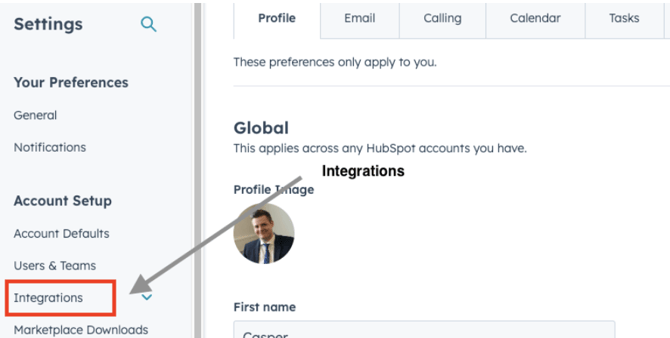
To disable DoCurrencies, log into your HubSpot account and go to Settings:

1. From your General profile page, click on Integrations in the left-side menu:
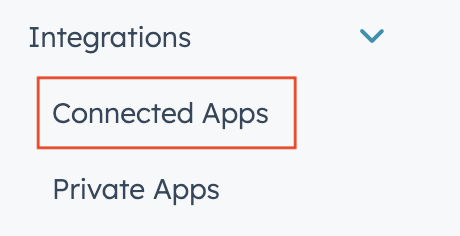
2. Next, click Connected Apps on the drop-down Integrations menu
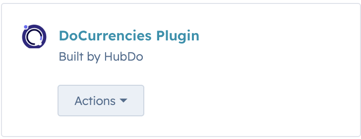
3. Click DoCurrencies
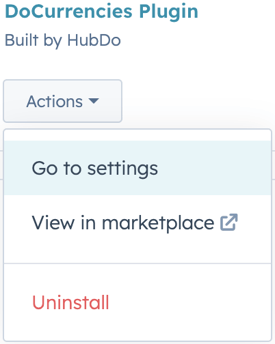
4. Click DoCurrencies Actions to Go to Settings to toggle the scheduler Switch to update OFF position:
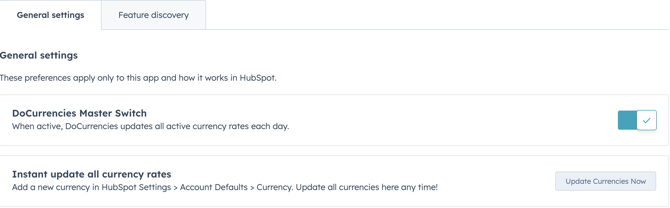
2. To uninstall the DoCurrencies app completely:
Follow the steps above to reach Settings > Connected Apps
Click the Actions button and select Uninstall
Once you've selected DoCurrencies in your Connected Apps screen.
Click on the Actions drop-down arrow option and click Uninstall:
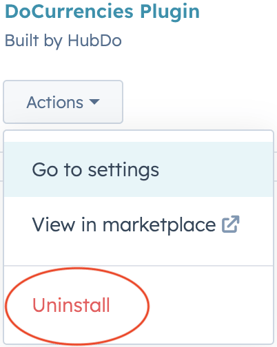
3. How to cancel my DoCurrencies subscription
If you do not plan to install DoCurrencies again and wish to cancel your DoCurrencies Subscription, contact support@hubdo.com
4. How will uninstalling DoCurrencies affect my data?
- Uninstalling DoCurrencies will not affect your existing HubSpot data.
- DoCurrencies does NOT create any custom properties in your HubSpot portal.
- All existing exchange rate history recorded in your HubSpot portal will remain intact.
- All exchange rates recorded in closed deals will remain unchanged.
- When DoCurrencies is uninstalled, the currency rates in your HubSpot settings will no longer be updated automatically each day.
For more information, contact HubDo via the chat button or email support@hubdo.com