
In this article
- How to temporarily disable DoPricer CPQ
- How to uninstall DoPricer CPQ
- How uninstalling affects your data
1. How to temporarily disable DoPricer CPQ
Disabling DoPricer using the Master Switch stops it from processing all Line Items across your portal, without removing the app or your configuration.
To disable DoPricer, log in to your HubSpot account and go to Settings:

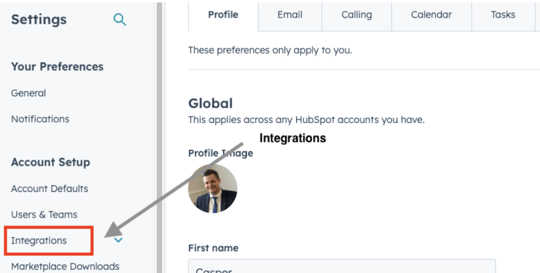
1. From your General profile page, click Integrations in the left-side menu:
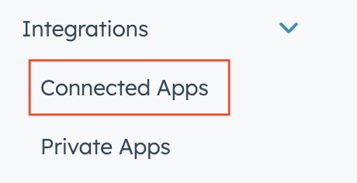
2. Click Connected Apps in the Integrations drop-down menu:
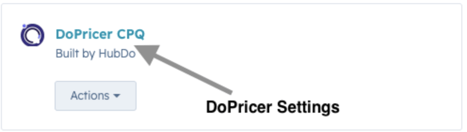
3. Click DoPricer CPQ:
4. Click the Master Switch to toggle it to the OFF position:

Note: You must have an active free or paid DoPricer subscription for your portal to toggle the Master Switch ON. For help, contact HubDo via the chat button or email support@hubdo.com.
2. How to uninstall DoPricer CPQ
Follow steps 1–3 above to reach the DoPricer CPQ screen in Connected Apps.
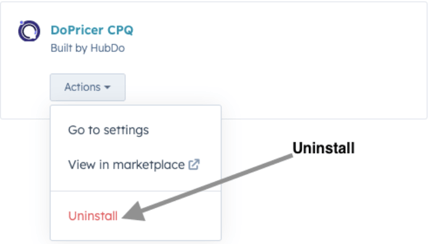
Click the Actions drop-down and select Uninstall:
3. How uninstalling affects your data
Uninstalling DoPricer will not affect your existing HubSpot data.
When DoPricer is first installed, it creates several properties in DoPricer groups on your Company and Product objects. Depending on your configuration, your portal may also contain additional properties for per-category discounts and/or custom price lists — these are created by HubDo Support during set up or on request.
All of these properties are used by DoPricer to set the correct prices and discounts on Line Items. After uninstalling, you may archive and delete the DoPricer properties if you no longer need to retain the pricing or discount information stored on your Company and Product records.
Note: Deleting DoPricer properties on Companies and Products will not affect prices or discounts on any existing HubSpot Line Items, Deals, or Quotes.
DoPricer Company properties include:
- DoPricer Enabled — On/Off switch for DoPricer at Company level
- DoPricer Default Discount — fallback discount applied when no product or category match is found
- Per-product discount rules and any custom price lists assigned to each Company
DoPricer Product properties include:
- DoPricer Discount Always Empty — prevents any discount being applied to a specific Product
- Custom price list properties to suit your configuration
Note: Product properties also appear on HubSpot Line Items.
Important: The DoPricer Discount Message and DoPricer Price Message properties record the pricing and discount decisions DoPricer made on each Line Item. Do not archive or delete these two properties if you want to retain that record on existing Line Items.
For more help please email support@hubdo.com